
By Michaela Aldridge · 11 October 2026
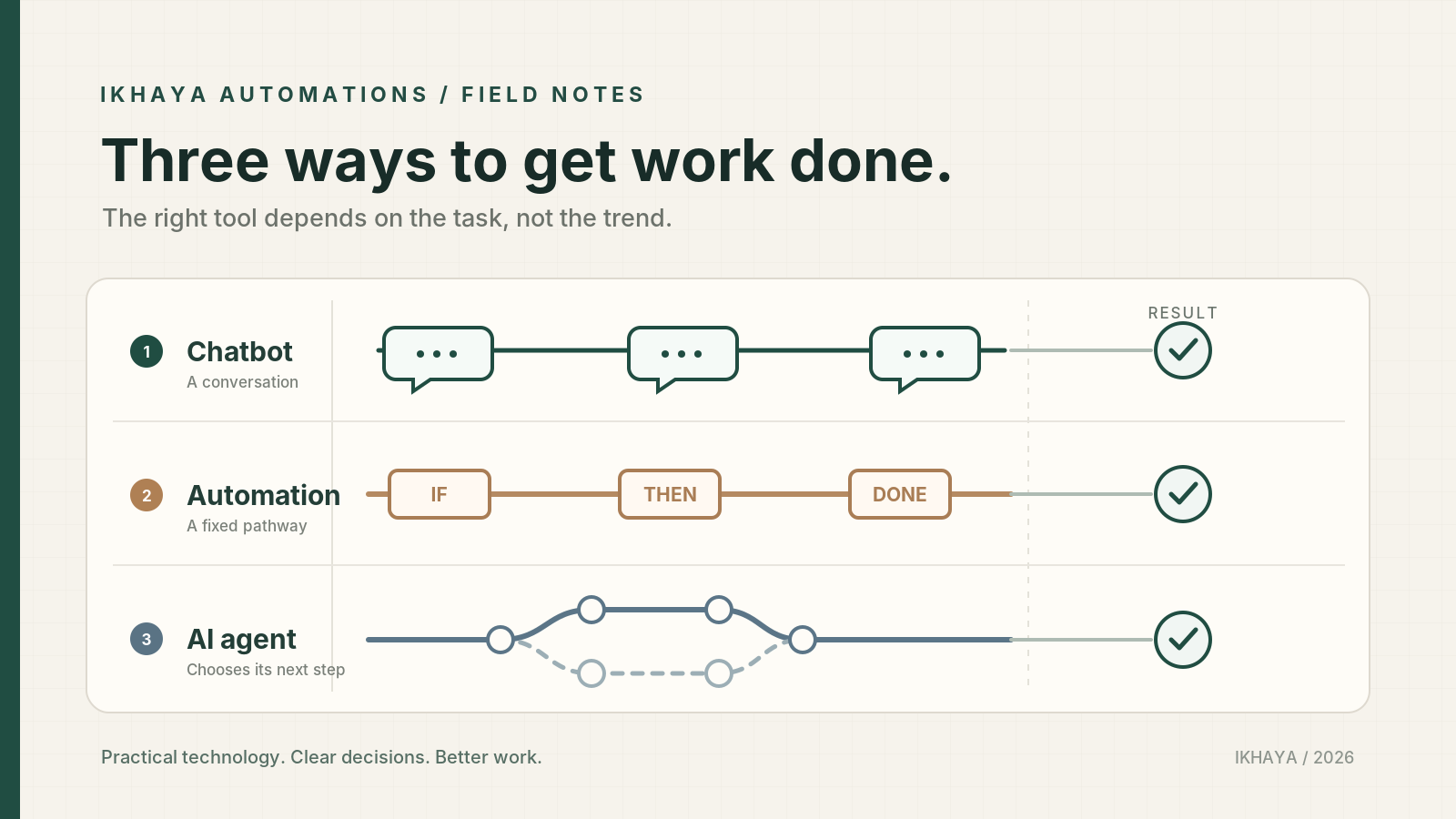
Somebody in a meeting says “we should look at an AI agent for that,” and everyone nods, and nobody quite asks what they mean. It’s become one of those phrases that gets used to cover chatbots, automated workflows, and autonomous systems, all in the same breath.
That’s not a criticism of anyone using the term loosely. The vocabulary genuinely has moved faster than most people’s day-to-day exposure to it. But if your business is about to spend money, or hand over access to systems, based on something being called an “agent,” it’s worth thirty seconds of clarity first.
This article will walk through what an agent actually is, how it relates to a chatbot and to a conventional automation, and how to work out which approach, if any, a given task actually needs.
Chatbot, automation, or agent: the basic difference
It helps to think of these as three overlapping ideas rather than three completely separate boxes.
At its simplest, a chatbot answers questions through a conversational interface. That interface might sit in front of a very basic question-answering system, in which case it just matches your question to a pre-written answer. But the same conversational front end could equally sit in front of a fixed automation, or in front of a genuine AI agent. So “chatbot” describes the way you interact with something, the chat window, rather than telling you what’s actually happening underneath. Some conversational systems are read-only and simply respond; others can use tools or trigger a workflow as part of the conversation. It depends entirely on what’s been built behind the scenes.
A rules-based automation, the kind you’d build in Power Automate, follows a predefined pathway. When this happens, do that. If a field says “approved,” move the file here; if it says “rejected,” send this email. It has no judgement of its own; it follows the same route every time. That doesn’t necessarily mean the real-world result is always identical, because the data it’s working with, or the external systems it connects to, can change. But the logic and the steps it follows stay fixed. Microsoft’s own documentation on Copilot Studio describes this kind of flow as deterministic in that sense: given the same inputs, it will always follow the same path, which is what makes it predictable and easy to trust.
An AI agent is different again. Rather than following one fixed path, it’s given a goal and some tools, and it works out the steps itself. Anthropic, the company behind the Claude AI models, describes the building block of an agent as a language model that’s been given the ability to search for information, use tools, and remember context from earlier in a task, so that it can plan a route to a result rather than simply reacting once. Microsoft’s material on autonomous agents in Copilot Studio describes something similar: an agent that can decide the best next action based on its instructions and the situation in front of it, rather than following one pre-written path.
Agents also aren’t all-or-nothing when it comes to autonomy. Some are read-only, meaning they can look things up and draft suggestions but can’t change anything. Others are set up to pause and ask for approval at particular checkpoints before doing anything consequential. And some are permitted to take certain low-stakes actions automatically, while anything more significant still waits for a person to say yes. How much autonomy an agent has is a design choice, not a fixed property of “being an agent.”
The plain-language version: a chatbot is the conversation window you use, an automation follows a predefined route, and an agent can choose steps and tools towards a goal, within the permissions and checks it has been given.
What “using tools” and “taking actions” actually mean
This is the part that trips people up, because it sounds abstract until you see it in practice.
A “tool,” in this context, just means something the AI has been given permission to use beyond generating text. That might be a search function, a connection to your email, access to a spreadsheet, or the ability to create a calendar entry. “Taking an action” means using one of those tools to affect an external system, for example creating a calendar entry, updating a record, or preparing an email within the organisation’s inbox. An agent can still be required to obtain a person’s approval before the action is completed; that’s the meaningful distinction, not whether a human happens to review it afterwards.
So there’s a real difference between:
- Asking ChatGPT or Claude to draft an email, which you then read, edit, and send yourself, and
- Giving a connected AI system permission to read your inbox and draft a reply on its own initiative, whether or not it’s also allowed to send it without you seeing it first.
The first is straightforward assistance. The second involves the system acting within your systems, even if a human checkpoint is built in before anything external happens. Both can be useful. They are not the same level of risk, and they shouldn’t be treated as though they are.
Realistic examples from an ordinary working week
A few situations where the distinction actually matters:
Filing supplier invoices. If every invoice arrives in a consistent format and simply needs saving into the right folder, that’s a straightforward rules-based automation. But if you need to extract details from invoices that vary in layout, supplier, or file type, that typically requires a document-processing tool such as OCR or AI Builder, and it’s worth knowing that this kind of capability often carries its own licensing or usage costs on top of a basic automation. It’s still not necessarily “an agent,” but it’s a step up from a simple move-this-file rule.
Triaging a shared inbox with wildly varying requests. This doesn’t automatically call for a fully autonomous agent. A workable middle ground is an AI-assisted classification step: the AI reads and categorises each message, fixed rules determine where each category is routed, and a person reviews anything the system is uncertain about. That gives you much of the benefit without handing over full decision-making.
Answering “what’s our returns policy?” on a website. A simple conversational lookup is enough here. No action needs to be taken, no data needs to change, it just needs to answer accurately from a fixed source.
Pulling together a weekly report. An AI system can be useful for gathering the relevant files and drafting a first-pass summary. What it shouldn’t be left to do unsupervised is validate the underlying figures. A person still needs to check the source data and confirm the conclusions before the report goes anywhere. That’s true whether the drafting was done by a simple assistant or a more autonomous agent.
When a plain automation is the better choice
It’s tempting to assume the newer, more sophisticated option is always the better one. In practice, a fixed automation is often the right call, not the fallback option, when:
- The process doesn’t change from one instance to the next.
- You need to be able to predict exactly what steps will run every time, for compliance or audit reasons.
- The cost or consequence of an unexpected outcome is high.
- Nobody available has the time to properly test and supervise something more autonomous.
A rules-based flow is boring, in the best sense. It follows the same steps, the same way, every single time. That’s a feature, not a limitation, for a lot of finance and admin work.
The additional risk that comes with agents
Every extra bit of autonomy an AI system has is also an extra bit of trust you’re placing in it. A conversational tool that gives a slightly wrong answer is embarrassing. An agent with access to your files or your email that takes the wrong action, based on a misunderstanding, or based on malicious instructions hidden in a document it has read (a risk known as prompt injection), is a materially bigger problem, because it can actually influence something rather than just say something.
This isn’t a reason to avoid agents altogether. It’s a reason to think about access, permissions, and human oversight as seriously as you’d think about giving a new starter the keys to your systems. Email access is a useful example: before connecting an agent to a shared inbox, decide exactly what it can read, draft, send and change, and where a person must approve the result.
What you can try
Before adopting or building anything described as an “AI agent,” write down, in one sentence, what decision it would need to make that a fixed rule couldn’t. If you can’t fill in that sentence, the task may be better served by an automation, and that’s often the cheaper, more reliable, and easier to maintain option, though the actual cost will depend on your licensing and how the automation is built.
In short
A chatbot is the conversational interface, an automation follows a fixed set of steps, and an agent works things out for itself, with a level of independence that can be dialled up or down by design. None of these is inherently better than the others; they’re suited to different kinds of task. The more autonomy and access a tool has, the more carefully its permissions and oversight need to be thought through, and that deserves as much attention as the promised time saving.
Read next on Ikhaya Automations
- Are You Paying for AI Tools Your Business May Already Have?
- AI Is Replacing Tasks. That Does Not Mean It Should Replace Us.
- Download the free AI & Automation Subscription Review workbook
Further reading
- Anthropic, “Building Effective AI Agents”, Anthropic engineering blog
- Microsoft Learn, “Agent flows FAQ”, Copilot Studio documentation
- Microsoft Learn, AI Builder document-processing FAQ
- Microsoft Learn, Licensing and Copilot Credits
- National Cyber Security Centre, “Mistaking AI vulnerability could lead to large-scale breaches, NCSC warns”

